Skisso
Last tested:
Skisso is free Chrome extension: point at any element on your live UI, edit it with real CSS, and hand your coding agent the exact patch (category: UI & Design-to-Code). VibeToolRank agent test score: 8.3/10 (tested 2026-10-17, 1 (single run), Chrome extension, free), #1 of 3 tested UI & Design-to-Code tools. Pricing: Free. Free tier: Yes: free on the Chrome Web Store.
Key facts
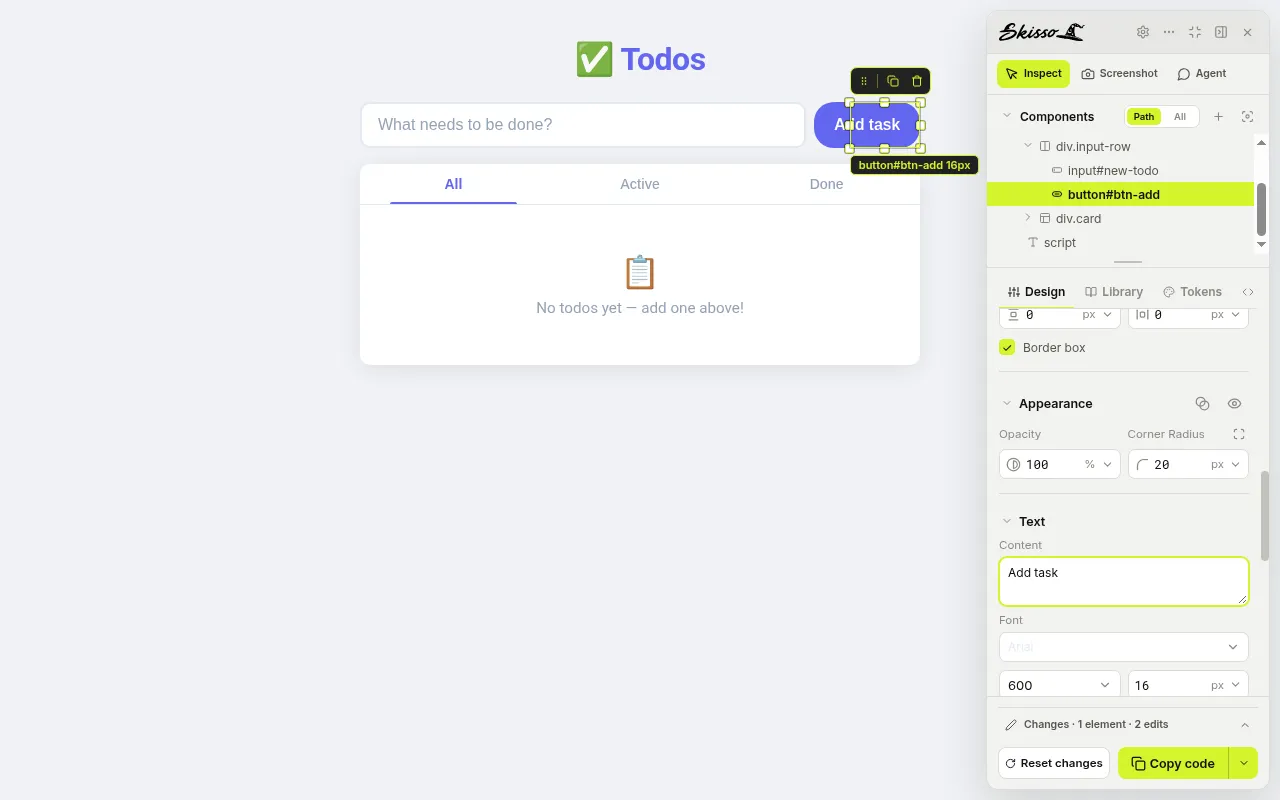
Verdict: On our T1 todo app, Skisso turned a visual edit (Add button radius 10px → 20px, label "Add task") into an exact, scoped handoff with selector, old and new values in about 2 seconds, with no account.
Best for: showing your coding agent an exact UI change instead of describing it.
Not ideal for: non-Chrome browsers.
- VibeToolRank score
- 8.3/10
- Rank
- #1 of 3 tested UI & Design-to-Code
- Category
- UI & Design-to-Code
- Last tested
- 2026-10-17
- Runs
- 1 (single run)
- Outcome score
- 8/10
- Edition tested
- Skisso 1.0.13 Chrome extension, free, no account
- Free plan, as measured
- No account and no usage limit hit; each patch took about 2 seconds. No usage limit seen in our test
- Free plan
- Yes: free on the Chrome Web Store
- Price
- Free
- Pricing checked
- 2026-10-17
- Sources
- skisso.app · producthunt.com/products/skisso-design-on-the-live-product · test log in our repo
Pricing and free tier
Current official pricing (checked ): Free
Is Skisso free? Yes: free on the Chrome Web Store
Free on the Chrome Web Store; no account needed for inspect, edit and copy.
verified-official official source · full-page-read. Official plan limits can change; re-check the vendor page before paying. Figures from our tests are recorded observations, not a current-capacity promise.
What we measured in our test (2026-10-17, 1 (single run)): No account and no usage limit hit; each patch took about 2 seconds Skisso free tier: how far you get
Agent test verdict
Edition tested Skisso 1.0.13 Chrome extension, free, no account. Results may differ for the hosted product.
Tested 2026-10-17 · 1 (single run) · rubric v0.1 (provisional thresholds). On our T1 todo app, Skisso turned a visual edit (Add button radius 10px → 20px, label "Add task") into an exact, scoped handoff with selector, old and new values in about 2 seconds, with no account. A small free coding agent applied that handoff correctly in 1 of 3 runs, which says more about the agent than about Skisso.
| Dimension | Score /10 |
|---|---|
| Outcome (40%) | 8 |
| Speed (15%) | 9 |
| Cost (15%) | 10 |
| Developer experience (15%) | 7 |
| Reliability (15%) | 8 |
| Overall | 8.3 |
How we tested
- Skisso 1.0.13 Chrome extension, no account, tested 17 Oct 2026.
- Task: on our T1 todo app, change the Add button's corner radius from 10px to 20px and its label to "Add task", copy the handoff, and give it to a free coding agent (OpenCode, big-pickle).
- Skisso produced an exact patch in about 2 seconds. The free agent applied it fully in 1 of 3 runs; one run changed a global radius token instead, and one made no change.
Pros, cons and who it's for
Pros
- Free, no account or login needed
- Handoff names the exact selector, old and new values and scope
- Fast: about 2 seconds from selecting an element to a copied patch
- Live CSS editing on the real page, including localhost
Cons
- Chrome only
- Text edits list the new text but not the old one
- The handoff asks the agent to verify and show the result, which stalled headless agents in our runs
- MCP and project connection not tested yet
Who it's for: Designers and vibe coders who want to show their AI coding agent a precise UI change instead of describing it in prose.
Free-tier limits: Free on the Chrome Web Store; no account needed for inspect, edit and copy.
FAQ
Is Skisso free?
Yes. It is a free Chrome extension and we used it without an account.
Does Skisso write the code?
No. It produces a precise patch (selector, old and new values) that you hand to your coding agent, which edits the source.
How did Skisso do in our test?
It produced an exact, scoped patch in about 2 seconds and scored 8.3/10. How well the change lands depends on your coding agent.
How did Skisso score in VibeToolRank's test?
8.3/10 overall (outcome 8, speed 9, cost 10, developer experience 7, reliability 8), 1 (single run) on 2026-10-17. On our T1 todo app, Skisso turned a visual edit (Add button radius 10px → 20px, label "Add task") into an exact, scoped handoff with selector, old and new values in about 2 seconds, with no account.
Who is Skisso best for?
Based on our test: best for showing your coding agent an exact UI change instead of describing it. Not ideal for non-Chrome browsers.
How much does Skisso cost?
Free (from the official pricing page, checked 2026-10-17).
Related
Comparisons
Other UI & Design-to-Code
- Figma Make — 8/10
- Builder.io — 6.7/10
Best UI & Design-to-Code · Best free UI & Design-to-Code · All tools · How we test
Sources
Scores come from our own tests and are never for sale; sponsored placements are always labelled. Some links are affiliate links (currently Railway). Disclosure