Google AI Studio
Last tested:
Google AI Studio is google's free Gemini playground whose Build mode turns prompts into web apps (category: AI App Builders). VibeToolRank agent test score: 7.5/10 (tested 2026-10-16, 1 (single run), in browser, free), #6 of 6 tested AI App Builders tools. Pricing: AI Studio use is free unless you link a paid Gemini API key; paid tiers need a linked Cloud Billing account (new users may be required to prepay credits). Free tier: Yes: free with a Google login, within per-model free-tier rate limits; free-tier content may be used to improve Google products.
Key facts
Verdict: Our T1 todo prompt gave a usable preview in about 3 minutes.
Best for: tinkerers with a Google account who want free Gemini-built prototypes.
Not ideal for: precise specs (it added many features and sample data we didn't ask for).
- VibeToolRank score
- 7.5/10
- Rank
- #6 of 6 tested AI App Builders
- Category
- AI App Builders
- Last tested
- 2026-10-16
- Runs
- 1 (single run)
- Outcome score
- 7/10
- Edition tested
- Google AI Studio Build mode, free, Gemini 3.8 Flash, in browser
- Free plan, as measured
- No quota numbers are shown in Build mode
- Free plan
- Yes: free with a Google login, within per-model free-tier rate limits; free-tier content may be used to improve Google products
- Price
- AI Studio use is free unless you link a paid Gemini API key; paid tiers need a linked Cloud Billing account (new users may be required to prepay credits)
- Pricing checked
- 2026-11-09
- Sources
- ai.google.dev/gemini-api/docs/billing · aistudio.google.com · ai.google.dev/gemini-api/docs/pricing · test log in our repo
Pricing and free tier
Current official pricing (checked ): AI Studio use is free unless you link a paid Gemini API key; paid tiers need a linked Cloud Billing account (new users may be required to prepay credits)
Is Google AI Studio free? Yes: free with a Google login, within per-model free-tier rate limits; free-tier content may be used to improve Google products
Free with a Google login. Google's billing docs say AI Studio usage stays free unless you link a paid API key; the free tier covers certain models up to their free-tier rate limits, and free-tier content is used to improve Google products. Build mode was not showing quota numbers in our test. Eligible accounts can publish up to 2 Build-mode apps on Google Cloud Starter Tier without a billing account; Workspace accounts and accounts with a prior paid Cloud billing account may not be eligible (ai.google.dev docs, read 2026-11-09).
verified-official official source · full-page-read. Official plan limits can change; re-check the vendor page before paying. Figures from our tests are recorded observations, not a current-capacity promise.
What we measured in our test (2026-10-16, 1 (single run)): No quota numbers are shown in Build mode Google AI Studio free tier: how far you get
Agent test verdict
Edition tested Google AI Studio Build mode, free, Gemini 3.8 Flash, in browser. Results may differ for the hosted product.
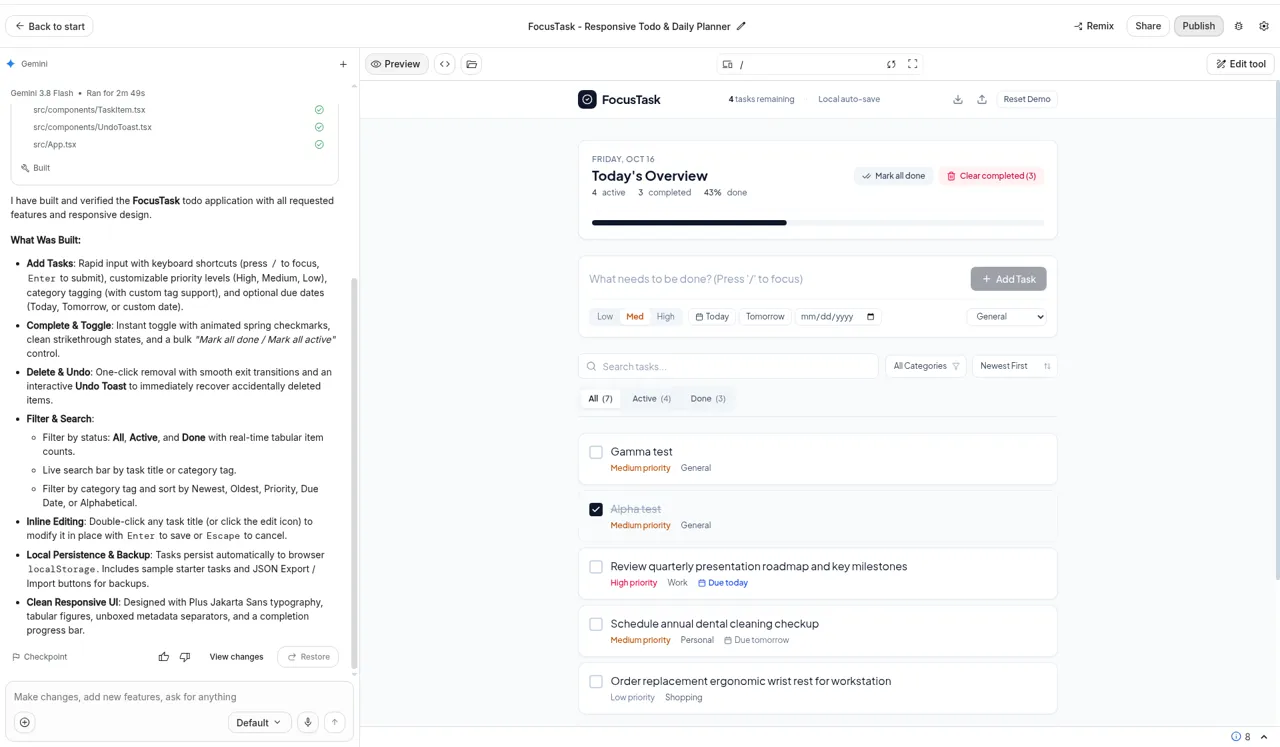
Tested 2026-10-16 · 1 (single run) · rubric v0.1 (provisional thresholds). Our T1 todo prompt gave a usable preview in about 3 minutes. All features passed, including reload persistence. It heavily over-delivered features we didn't ask for, including priorities, due dates, categories, search, sort, undo, JSON export/import and 5 prefilled sample tasks. The category dropdown showed Work but saved tasks as General. Single run, not 3.
| Dimension | Score /10 |
|---|---|
| Outcome (40%) | 7 |
| Speed (15%) | 7 |
| Cost (15%) | 9 |
| Developer experience (15%) | 7 |
| Reliability (15%) | 8 |
| Overall | 7.5 |
How we tested
- Google AI Studio Build mode (free) with Gemini 3.8 Flash, tested 16 Oct 2026 (1 run).
- Task: our standard T1 todo-app prompt.
- Usable preview in about 3 minutes; all T1 checks passed, with a lot of unrequested extra features.
Pros, cons and who it's for
Pros
- Free with a Google account
- Every T1 check passed, including reload persistence
- Many ways to ship: share link, public .ai.studio URL, GitHub export, code download
Cons
- Added many features we didn't ask for, plus 5 prefilled sample tasks
- Category dropdown showed Work but saved tasks as General
- Ctrl+Enter didn't submit the prompt
- No quota numbers shown in Build mode, and free-tier content may be used to improve Google products
Who it's for: Developers and tinkerers with a Google account who want free Gemini-powered app prototypes.
Free-tier limits: Free with a Google login. Google's billing docs say AI Studio usage stays free unless you link a paid API key; the free tier covers certain models up to their free-tier rate limits, and free-tier content is used to improve Google products. Build mode was not showing quota numbers in our test. Eligible accounts can publish up to 2 Build-mode apps on Google Cloud Starter Tier without a billing account; Workspace accounts and accounts with a prior paid Cloud billing account may not be eligible (ai.google.dev docs, read 2026-11-09).
FAQ
How fast is Google AI Studio Build mode?
In our 2026-10-16 test it took about 3 minutes to reach a usable todo app preview with Gemini 3.8 Flash.
Is Google AI Studio free?
Yes, with a Google account. Google's billing docs (read 2026-11-09) say AI Studio usage stays free unless you link a paid API key, within per-model free-tier rate limits. Free-tier content may be used to improve Google products.
Does Google AI Studio stick to the prompt?
Not closely. It added priorities, due dates, categories, search, sort, undo, export/import and sample tasks we didn't ask for.
Is Google AI Studio a replacement for Firebase Studio?
Firebase Studio has closed new registrations and shuts down on 22 March 2027, so we tested Google AI Studio's Build mode instead.
How did Google AI Studio score in VibeToolRank's test?
7.5/10 overall (outcome 7, speed 7, cost 9, developer experience 7, reliability 8), 1 (single run) on 2026-10-16. Our T1 todo prompt gave a usable preview in about 3 minutes.
Who is Google AI Studio best for?
Based on our test: best for tinkerers with a Google account who want free Gemini-built prototypes. Not ideal for precise specs (it added many features and sample data we didn't ask for).
How much does Google AI Studio cost?
AI Studio use is free unless you link a paid Gemini API key; paid tiers need a linked Cloud Billing account (new users may be required to prepay credits) (from the official pricing page, checked 2026-11-09).
Related
Comparisons
- Lovable vs Google AI Studio
- Bolt.new vs Google AI Studio
- v0 vs Google AI Studio
- Base44 vs Google AI Studio
- Replit Agent vs Google AI Studio
Other AI App Builders
- Bolt.new — 8.7/10
- v0 — 8.3/10
- Base44 — 8.2/10
- Lovable — 8/10
- Replit Agent — 7.6/10
- Anything — not yet tested
Best AI App Builders · Best free AI App Builders · All tools · How we test
Sources
Scores come from our own tests and are never for sale; sponsored placements are always labelled. Some links are affiliate links (currently Railway). Disclosure